
reVVerb Kullanım Kılavuzu reVVerb User Guide
reVVerb'in macOS üzerinde kurulumu ve kullanımı için hızlı kılavuz. Bu sürüm AU ve VST3 formatlarını, ayrıca PKG installer seçeneğini içerir ve Punkat Music tarafından kişisel kullanım için ücretsiz sunulur. A quick guide to installing and using reVVerb on macOS. This release includes AU and VST3 formats, plus a PKG installer option, and is provided as a free personal-use download by Punkat Music.
Kurulum Installation
Pakette bulunanlar Included files
- PunkatRevVerb.component — AU
- PunkatRevVerb.vst3 — VST3
- PunkatRevVerb.pkg — PKG installer
- Kurulum notları Installation notes
- Hızlı başlangıç notları Quick start notes
- Kişisel kullanım lisans metni Personal-use license text
Plugin klasörleri Plugin folders
- AU: /Library/Audio/Plug-Ins/Components/
- VST3: /Library/Audio/Plug-Ins/VST3/
Kurulum adımları Install steps
- macOS klasör paketini indir. Download the macOS folder package.
- En hızlı yol için PunkatRevVerb.pkg dosyasına çift tıklayıp kurulumu tamamla. For the fastest setup, double-click PunkatRevVerb.pkg and complete the installation.
- Manuel kurulum istersen PunkatRevVerb.component dosyasını Components klasörüne kopyala. If you prefer manual installation, copy PunkatRevVerb.component to the Components folder.
- Manuel kurulumda PunkatRevVerb.vst3 dosyasını VST3 klasörüne kopyala. For manual installation, copy PunkatRevVerb.vst3 to the VST3 folder.
- DAW açıksa yeniden başlat; gerekirse plugin taramasını yeniden çalıştır. Restart your DAW if it was already open, and rescan plugins if needed.
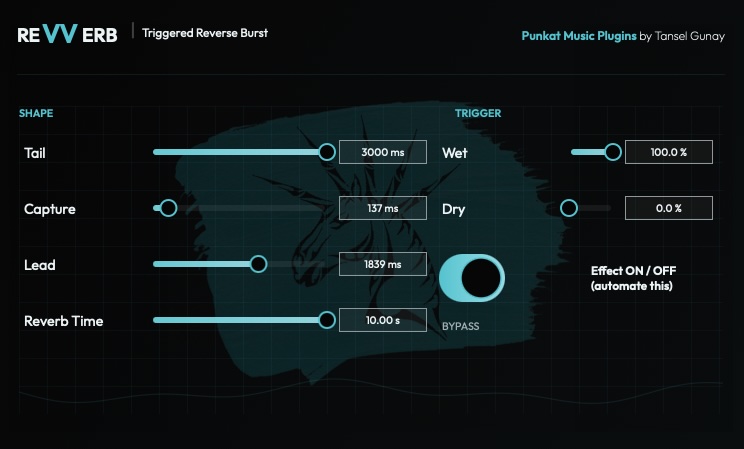
Kontroller Controls
Tail
Genel tail uzunluğunu belirler ve reverse burst etkisinin ne kadar geniş hissedileceğini tanımlar. Sets the overall tail length and helps define how extended the reverse burst feels.
Capture
Reverse tarzındaki efekt üretimi için ne kadar kaynak materyal alınacağını ayarlar. Adjusts how much source material is captured for the reverse-style effect generation.
Lead
Efektin hedef vuruş veya frase öncesine ne kadar uzanacağını belirler. Defines how far the effect reaches forward into the transition moment before the target hit or phrase.
Reverb Time
Oluşan reverb bloom'un uzunluk ve yoğunluk hissini kontrol eder. Controls the length and density impression of the generated reverb bloom.
Wet
Çıkışta ne kadar işlenmiş sinyal duyulacağını ayarlar. Sets how much processed signal is heard in the output.
Dry
Efektle birlikte ne kadar orijinal sinyalin kalacağını ayarlar. Sets how much original unprocessed signal remains alongside the effect.
Önerilen iş akışı Recommended workflow
- reVVerb'i işlemek istediğin track'e ekle. Insert reVVerb on the track you want to process.
- Reverse burst'in bir sonraki ana bağlanacağı noktayı belirle. Find the point where you want the reverse burst to lead into the next moment.
- Plugin'i sadece gereken yerde aktif edecek şekilde otomasyon yaz. Automate the effect ON/OFF so the plugin is active only where needed.
- Wet yüksek ve Dry düşük ile başla, sonra mix'e göre dengele. Start with Wet high and Dry low, then rebalance to fit the mix.
- Tail, Capture ve Lead'i rise müzikal ve zamanlama olarak doğru hissettirecek şekilde ayarla. Adjust Tail, Capture and Lead until the rise feels musical and correctly timed.
- Daha sıkı bir burst veya daha dramatik bir wash için Reverb Time'i kullan. Use Reverb Time to push the effect toward either a tighter burst or a more dramatic wash.
İyi kullanım senaryoları Good use cases
- Vokal geçiş swell'leri Vocal transition swells
- Drop öncesi vurgu anları Impact moments before drops
- Davul fill ve snare geçişleri Drum fills and snare transitions
- FX anları ve sinematik rise'lar FX moments and cinematic rises
Doğru bakış açısı Best mindset
reVVerb'i odaklı bir yaratıcı araç gibi düşün. Tüm track boyunca açık bırakmak yerine seçili anlarda kullan. Think of reVVerb as a focused creative utility. Use it for selected moments rather than leaving it active throughout the whole track.
İpuçları Tips
Seçici kullan Keep it selective
Kısa ve bilinçli efekt burst'leri genelde sürekli kullanıma göre daha müzikal ve daha dramatik duyulur. Short, intentional effect bursts usually sound more musical and more dramatic than constant use.
Zamanlamayı kulakla eşleştir Match the timing by ear
Lead ve Capture ayarları, kaynağın ritmik bağlamını dinleyerek yapıldığında en iyi sonucu verir. Lead and Capture settings work best when adjusted by listening to the exact rhythmic context of the source.
Wet ve Dry dengesini kur Balance Wet and Dry
Efekt kaynağı boğuyorsa Wet'i azalt veya biraz Dry geri getir. If the effect overwhelms the source, reduce Wet or bring back some Dry to keep the mix stable.
Gerekirse yeniden tara Rescan if needed
DAW plugin'i hemen görmezse DAW'i yeniden başlat ve plugin taramasını yeniden yap. If your DAW does not detect the plugin immediately, restart the DAW and perform a plugin rescan.
Destek Support
Bu sürüm yalnızca kişisel kullanım için ücretsiz sunulur. Dosyaları doğrudan yeniden dağıtmayın. reVVerb'i paylaşmak istiyorsanız insanları resmi indirme sayfasına yönlendirin. This release is provided free of charge for personal use only. Please do not redistribute the files directly. If you want to share reVVerb, send people to the official download page instead.